![emtech_logo_blue.png]](https://44512403.hs-sites.com/hs-fs/hubfs/emtech_logo_blue.png?height=40&name=emtech_logo_blue.png)
You can easily customize your platform branding by updating your logo. Follow these steps to edit the current logo and upload your own:
1. Access the Logo Settings
- Login to the EMTECH platform at https://app.emtech.com
-
Locate the Current Logo (EMTECH).
2. Edit Your Logo
-
Click the Edit button next to the EMTECH logo.
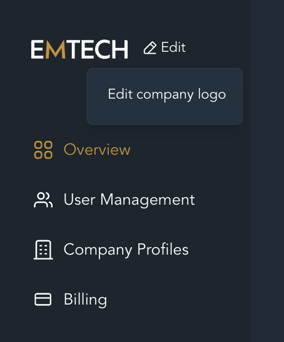
2. A pop-up or upload panel will appear, giving you the option to Upload Your Logo.
3. Upload Your Own Logo
-
Select your desired logo file from your device.
-
Allowed file formats:
-
PNG (.png)
-
JPEG (.jpg / .jpeg)
-
GIF (.gif)
-
-
File size limit: Up to 10MB
4. Optimize Your Logo for Best Results
-
Recommended aspect ratio: 2:1
-
Example dimensions: 400×200px or 600×300px
-
A properly sized logo ensures it looks sharp and professional across all devices.
5. Save Your Changes
After uploading, click Update to update your logo. Your new logo will now appear on your platform.