![emtech_logo_blue.png]](https://44512403.hs-sites.com/hs-fs/hubfs/emtech_logo_blue.png?height=40&name=emtech_logo_blue.png)
To address any general questions or inquiries regarding the product, resolve account issues, or request the setup of a new account on the EMTECH portal/products, please select the “General Support Assistance” option to submit a ticket to the EMTECH support team.
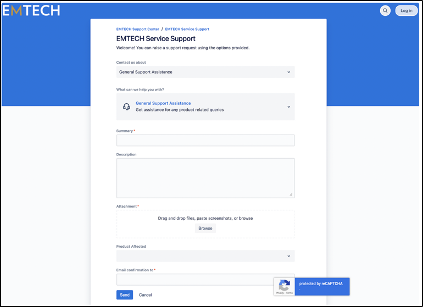
When completing the General Support Assistance form, please ensure that you fill out the relevant sections, noting that some are required for submission.
- **Summary**: Provide a brief overview of your request or question.
- **Description**: Include detailed information regarding your request, along with any additional context that may be helpful.
- **Attachment**: If applicable, attach any supporting documents that could assist in the investigation.
- **Product affected**: Choose the specific product related to your inquiry.
- **Email Confirmation to**: Input the email addresses of those who should receive updates regarding this ticket.
Once all the relevant details are filled out, submit the request.
1. General Support Assistance – Request a new account
To initiate a request for a new user account on the Sandbox platform, please select the “General Support Assistance – Request a new account” option.
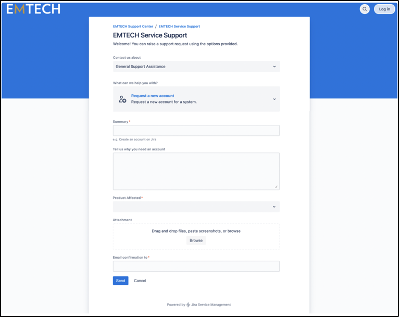
On the General Support Assistance form, please choose the option labeled “Request a new account” and complete the necessary sections of the form, noting that some fields are required for submission.
- **Summary**: Provide a brief overview of your request or question.
- **Tell us why you need an account**: Please explain your reasons for needing a new account (for instance, you may state, "I require a new user to be set up on the Sandbox portal") and provide the following details:
- Requestor’s First Name
- Requestor’s Last Name
- Requestor’s Email ID
- **Product affected**: Select the relevant product associated with your request.
- **Attachment**: Include any supporting documents that may assist in processing your request.
- **Email Confirmation to**: Enter the email addresses of individuals who should receive updates regarding this ticket.
2. General Support Assistance – Fix an account problem
To address any general questions or inquiries related to the product, resolve account issues, or request the setup of a new account on the EMTECH portal/products, please select the “General Support Assistance – Fix an account problem” option.
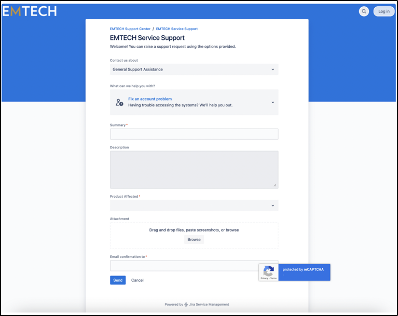
In the General Support Assistance form, please ensure to complete all relevant sections, noting that some fields are mandatory for submission:
- **Summary**: Provide a concise overview of your request or question regarding your account or access.
- **Description**: Offer detailed information about your request, including any additional context that may enhance understanding.
- **Product affected**: Choose the specific product related to your inquiry to ensure accurate assistance.
- **Attachment**: If applicable, include any supporting documents that may facilitate the investigation of your request.
- **Email Confirmation to**: Enter the email addresses of individuals who should receive updates regarding this ticket.