![emtech_logo_blue.png]](https://44512403.hs-sites.com/hs-fs/hubfs/emtech_logo_blue.png?height=40&name=emtech_logo_blue.png)
To enhance your experience with our product, please choose the “Request a Change” option. This will allow you to propose new functionalities or suggest modifications to the existing features and services.
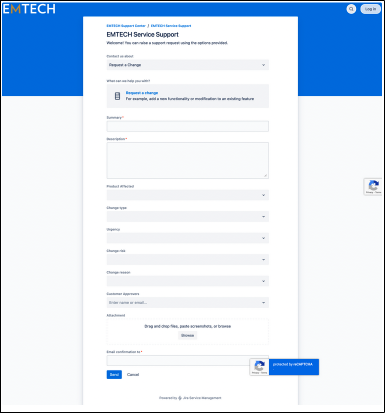
On the Change Request page, you will find several fields to complete:
- **Summary**: Provide a concise overview of the change you are proposing for the product or service.
- **Description**: Elaborate on the specifics of the change, detailing which product or service is affected.
- **Product Affected**: Choose the relevant product from the dropdown menu.
- **Change Type**: Indicate whether your request is for a Standard Change, Normal Change, or Emergency Change. Please note that Normal and Emergency Changes may require additional approvals from designated approvers.
- **Urgency**: Specify the urgency of the change, indicating how quickly you need it to be implemented.
- **Change Risk**: Assess and select the level of risk associated with your change request.
- **Change Reason**: State the reason for your proposed change.
- **Customer Approvers**: Enter the email addresses of the approvers from your organization, as this information is essential for any changes requiring further approval before implementation.
Once you have filled out the necessary information, attach any relevant supporting documentation and click “Send” to submit your ticket to EMTECH’s support team.