![emtech_logo_blue.png]](https://44512403.hs-sites.com/hs-fs/hubfs/emtech_logo_blue.png?height=40&name=emtech_logo_blue.png)
Connecting the test reporting APIs to your product profile allows you to conduct several successful test API reports. This step is crucial before submitting a sandbox application, as it ensures your readiness to report live transactions to the regulator through the reporting APIs, should you be approved to participate in the Sandbox.
To successfully integrate the test APIs, follow these essential steps:
1. **Locate the Client ID, Client Secret, and API Specification Documentation**Begin by navigating to Beyond Sandbox. From there, select the "Products" option and click on the "Test Products" tab to access the Test Product Profiles created. It is necessary to create your product profile to see your products in the list.
2. **Access Your Test Product Card**Identify and click on the Test Product card you have previously created.
3. **Review Product Details**Head over to the “Product Details” tab, where you will find the automatically assigned Client ID and Client Secret necessary for API authentication. Scroll down to locate these details on the page.
4. **Examine the API Specification Document**Click on the "Subscribed API" link on the right, to access the relevant API specification document that corresponds to the service type of your Test Product.
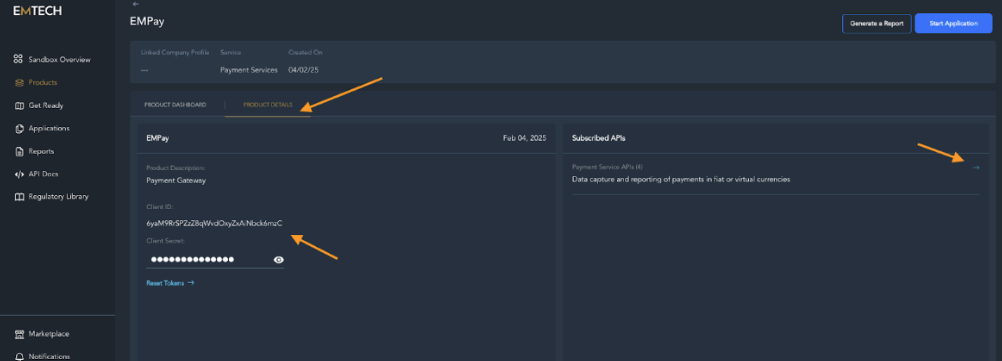
You can access the API documentation by selecting the “API Docs” option from the Beyond Sandbox menu and then clicking on “Test APIs” tab to locate the documentation relevant to your product and the associated APIs.
**Creating an Access Token:**
- Start by copying the Client ID and Client Secret from the Product Details section in your Test Product Profile.
- Proceed to make the Authentication HTTP call as outlined in the “Authorization” section of the API documentation.
- Upon successful execution, you will receive an access token in response.
**Reporting a Test Transaction/Event:**
- Utilize the REST APIs according to the guidelines provided in the API documentation.
- Remember to include the access token obtained after authentication in the authorization header of your requests.
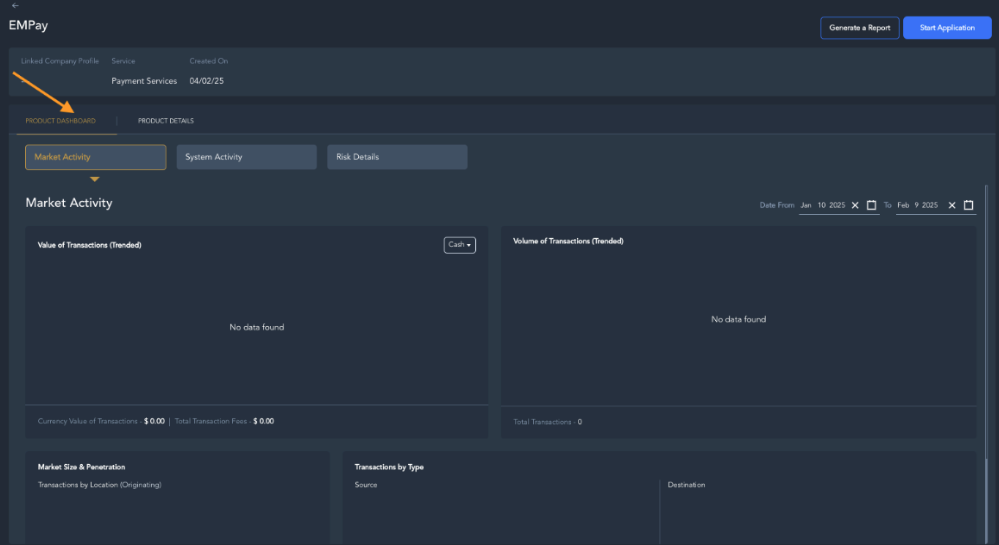
After connecting your product to the APIs, you can monitor Reporting and Analytics through the Dashboard.
Go to the product card, and click on the "Product Dashboard" tab.
Reporting options are organized by section within the Products dashboard. To view the Dashboard for a specific product, simply click on the Product card within the respective section and select the type of activity to monitor.
Upon successful completion of your test integration, you are now prepared to fill out and submit your application to the Regulator, enabling your participation in the Sandbox process.