![emtech_logo_blue.png]](https://44512403.hs-sites.com/hs-fs/hubfs/emtech_logo_blue.png?height=40&name=emtech_logo_blue.png)
To report any incidents or issues related to the products or services offered by EMTECH, please select the “Report an Incident” option.
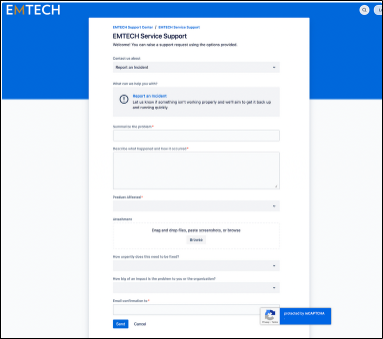
To complete the Incident form, please provide the following information:
- **Summary**: Briefly outline the issue you are encountering with the product or service.
- **Description**: Offer detailed information about the issue, including timestamps indicating when the problem began and the impact it has had on services.
- **Product Affected**: Please select the product that is impacted by the incident.
- **Attachment**: Include any relevant supporting documents that may assist in the investigation.
- **Urgency of Resolution**: Indicate how urgently this issue needs to be addressed by selecting the appropriate priority level (Critical, High, Medium, Low) based on its impact.
- **Impact on Organization**: Assess and select the level of impact this problem has on your organization.
- **Email Confirmation**: Enter the email addresses of individuals who should receive updates regarding this ticket.
Finally, click on “Send” to submit your ticket to EMTECH’s support team.